
Guide: Delete my account & data

If you want to permanently delete your account and all personal data from our CV builder, you can do so directly from your account settings. Follow the steps below carefully.
⚠️ Important: This action is permanent and cannot be undone.
Step-by-step guide
1. Log in to your account
Log in using your email address and password.
https://hirewrap.com/login/
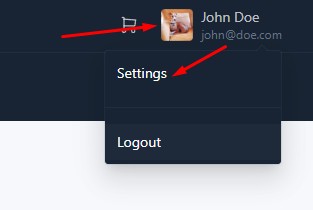
2. Go to Settings
Once logged in, navigate to your account Settings.
https://hirewrap.com/settings/
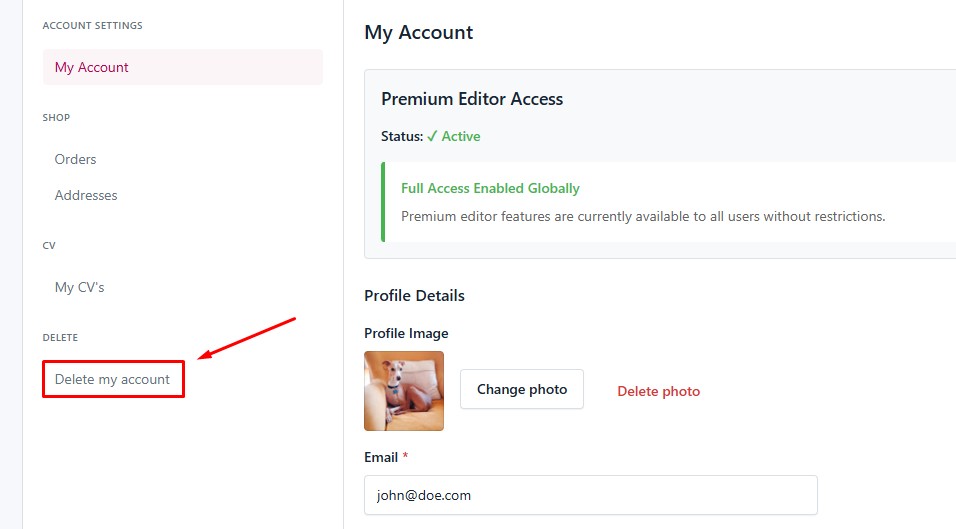
3. Open “Delete my account”
In the left-hand menu, click on the “Delete my account” tab.
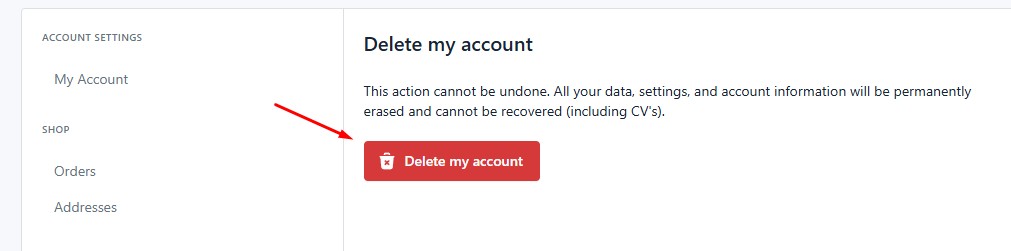
4. Confirm deletion
Click the “Delete my account” button and confirm when prompted.
What happens when you delete your account?
When you delete your account:
-
✅ All your CVs and personal data are permanently deleted
-
✅ This includes:
-
CV content
-
Personal details
-
Uploaded photos and images
-
-
✅ You will be automatically logged out
-
❌ The action cannot be undone
-
❌ Your account cannot be restored
About purchases and legal data
If you have made purchases through our webshop:
-
🧾 Order and payment data will be retained
-
This is required for legal, accounting, and KYC (Know Your Customer) purposes
-
No CV content or personal documents are kept beyond what is legally required
Need help?
If you have questions about data deletion, please create your own topic in this forum and we will assist you asap.

- Oh, bother! No replies were found here.
- The topic ‘Guide: Delete my account & data’ is closed to new replies.